Photography Invoice Template — PDF
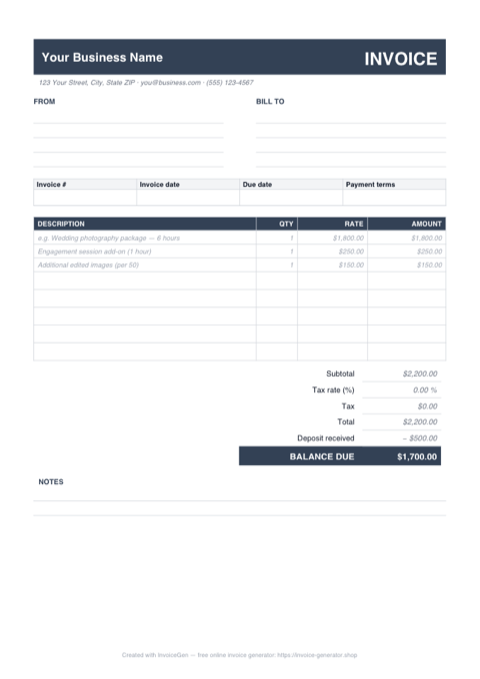
This PDF is the send-it-and-get-paid format. The layout is locked: the wedding-package line, deposit row, and balance due sit exactly where they were placed whether the file opens on a bride's phone, a planner's iPad, or a magazine's accounts-payable desktop. Print it, fill it, attach it — nothing moves.
Why PDF for Photographers
A fixed layout no client can rearrange
The template ships with labeled FROM and BILL TO blocks, an itemized table showing a sample 6-hour wedding package with an engagement add-on, and a totals stack that ends in BALANCE DUE. Everyone who opens it sees the same alignment and the same figures — there is no formula bar to poke at.
True A4, prints clean on US Letter too
The page is sized to A4, so it prints edge-perfect for international clients, and 'Fit to printable area' handles Letter paper without clipping the table. Hand a printed copy across the table at a booking consult or tuck one into an album delivery box.
A 4KB attachment that opens everywhere
The file is a few kilobytes — it clears strict corporate mail filters, previews inline in Gmail and Outlook, and never triggers a 'which app opens this?' reply. Your balance-due figure is visible before the client even downloads it.
The right format once the price is final
An editable file is for working out the quote; a static PDF is the closing document. Once the package, the extra edited images, and the retainer are agreed, the PDF becomes the fixed record both you and the client's accountant can rely on months later.
Invoicing Challenges for Photographers
Deposits and Balance Payments
Most photographers require a deposit to book a session and collect the balance on delivery. Tracking which clients have paid deposits and what remains due across dozens of bookings gets complicated fast.
Licensing and Usage Rights
Commercial clients pay differently depending on how they use your images. A single image licensed for a billboard campaign costs more than the same image on a blog post, and your invoice needs to spell this out.
Travel and Equipment Expenses
Destination shoots, rental gear, and assistant fees add up. If you do not itemize these on the invoice, clients question the total or you end up absorbing costs you should be passing through.
Photography PDF Invoicing Tips
Send the invoice PDF in the same email as the gallery link
For weddings and portrait sessions, attach the balance-due invoice to the gallery-delivery email rather than sending it separately. The client opens it at the moment they are most delighted with your work, and the payment ask never gets lost in a second thread. Name the file with the couple's surname and shoot date so their accountant can find it instantly.
Define Packages Clearly
List exactly what each package includes — number of edited images, hours of coverage, print credits — so clients can see the value and you have a reference point for add-ons.
Specify Usage Rights on the Invoice
State the license type (personal, commercial, exclusive) and duration directly on the invoice. This protects your intellectual property and justifies premium pricing for commercial usage.
Collect Deposits Before the Shoot
Require a non-refundable deposit (typically 25-50%) to reserve the date. Show it as a line item on the final invoice so the client sees the remaining balance clearly.
Itemize Post-Production Separately
Editing, retouching, and color grading take significant time. Breaking out post-production as its own line item helps clients understand your pricing and opens the door for upselling premium retouching.
What to Include on a Photography PDF Invoice
- Session date, time, and location
- Package or session type selected
- Number of final edited images included
- Licensing terms and usage rights granted
- Deposit paid and balance remaining
- Travel and accommodation expenses
- Additional retouching or print fees
- Delivery timeline for final images
Generate Your Photography PDF Invoice Now
Create Invoice — Free, No Sign-UpFrequently Asked Questions
Can I edit this photography invoice PDF after downloading it?
Should I print this invoice on A4 or US Letter?
What's the best way to email this PDF to a wedding client?
Related Invoice Tools
Photographers Invoice Generator
Free invoice generator for photographers. Handle session deposits, balance payments, licensing fees, travel expenses, and package pricing with professional PDF invoices.
PDF Invoice Template
Free PDF invoice template library — download, customize, and send.
Photography Invoice Template
Free photography invoice template for session fees, deposits, licensing, and travel expenses. Create polished PDF invoices that match your portfolio.
Photography Invoice — Excel
Free photography invoice template for Excel. Package and add-on rows multiply quantity by rate, the tax cell is editable, and the retainer feeds the balance.
Photography Invoice — Word
Free photography invoice template for Word. Swap the placeholder studio details for yours, drop a logo into the header, restyle the charcoal accents, then export a PDF.
Freelance Invoice — PDF
Free freelance invoice template as a print-ready A4 PDF with separate hourly and flat-fee tables, ruled fill-in fields, and a notes block. Fill it in and send.
Construction Invoice — PDF
Free construction invoice PDF with ruled fill-in fields, a schedule of values grid with example draw lines, and a retainage block. Print, fill, and send.
Contractor Invoice — PDF
Contractor invoice template in PDF — fill it on screen or by hand, print on A4 or Letter, and email a totals-locked bill to the GC. Free download, no sign-up.