Construction Invoice Template — PDF
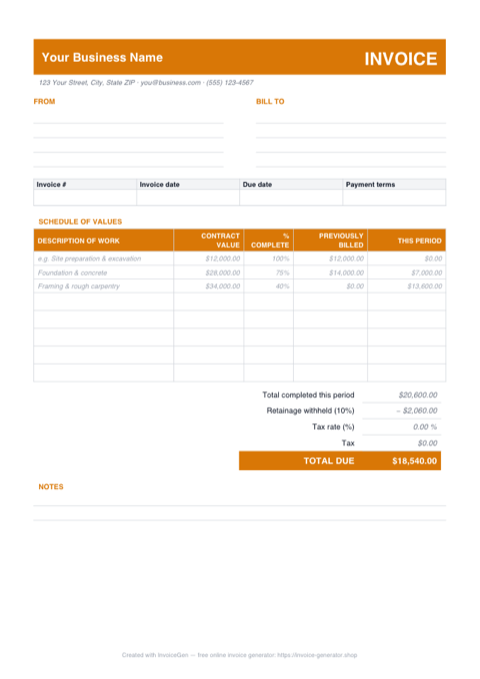
This PDF is built to be filled and sent, not fiddled with. You get ruled lines for your company and the owner's details, a schedule of values grid with gray example entries showing how a draw line reads, and a retainage deduction block above Total Due. Print a stack for the job folder or type straight onto it in any PDF reader — either way, the figures you submit are the figures on record.
Why PDF for Construction Companies
Ruled fields you fill by hand or keyboard
The FROM and BILL TO blocks are blank ruled lines, and the invoice number, dates, and payment terms sit in their own boxed row. Light-gray 'e.g.' entries — foundation work at 75% complete with $14,000 previously billed — show exactly how a progress-billing line should read before you write your own beneath them.
One page, printer-ready for the job folder
The whole layout — header, schedule of values, retainage block, notes — fits a single sheet. Run off copies for the superintendent's binder and the truck, fill one out at the kickoff walkthrough, and every pay cycle's paperwork looks identical from mobilization to closeout.
Attaches to email and AP portals as-is
The file is only a few kilobytes and renders identically in every PDF reader, browser, and phone. The owner's PM needs no construction software to open it, and Procore, GCPay, and Textura all accept a PDF upload without anyone re-keying your draw figures.
Static figures protect your pay application
Unlike a spreadsheet or Word file, nobody downstream can quietly nudge a percent complete or a contract value after you hit send. When this invoice later backs a conditional lien waiver or a disputed change order, a fixed document is exactly what you want in the record.
Invoicing Challenges for Construction Companies
AIA-Style Progress Billing
Many commercial projects require AIA G702/G703 formatted applications for payment. These involve schedule-of-values breakdowns, percentage-complete tracking, and cumulative billing — far beyond a simple invoice.
Subcontractor Cost Pass-Through
General contractors bill for their own work plus subcontractor costs. Each sub’s charges need to be clearly represented on the invoice so the owner can track costs by trade and verify the work was completed.
Lien Waiver and Compliance Requirements
Many states require lien waivers to accompany each payment application. Your invoicing workflow needs to account for collecting and submitting these documents alongside every billing cycle.
Construction PDF Invoicing Tips
Type onto it with the free Fill & Sign tool
You don't need a paid PDF editor. Open the file in Adobe Acrobat Reader and use Fill & Sign — or the Text tool in macOS Preview — to click any ruled line and type. Fill the schedule of values rows, save a copy named for the cycle (e.g. PayApp-03.pdf), and keep the downloaded master untouched for the next application.
Use a Schedule of Values
Break the total contract amount into a schedule of values by trade or phase. Each invoice shows the percentage complete and amount billed for each line item, giving the owner full cost visibility.
Track Retainage Cumulatively
Show retainage withheld on each invoice and maintain a running total. When the project reaches substantial completion, submit a separate invoice to release the accumulated retainage.
Separate GC Fees from Sub Costs
Clearly distinguish your general conditions and overhead from subcontractor pass-through costs. This transparency satisfies owner audits and streamlines payment approvals.
Reference Change Orders by Number
Every approved change order should have its own line in the schedule of values. Reference the CO number, date approved, and amount so the owner can reconcile each change against their records.
What to Include on a Construction PDF Invoice
- Project name, number, and site address
- Application number and billing period
- Schedule of values with percentage complete
- Work completed this period by line item
- Materials stored on-site (not yet installed)
- Retainage withheld (current and cumulative)
- Approved change order amounts
- Subcontractor cost breakdown by trade
Generate Your Construction PDF Invoice Now
Create Invoice — Free, No Sign-UpFrequently Asked Questions
Can I edit the figures in this PDF after downloading it?
Will it print correctly on US Letter paper?
What's the best way to email this invoice with a pay application?
Related Invoice Tools
Construction Companies Invoice Generator
Free invoice generator for construction companies. Handle AIA-style progress billing, subcontractor costs, retainage, lien waivers, and change orders.
PDF Invoice Template
Free PDF invoice template library — download, customize, and send.
Construction Invoice Template
Free construction invoice template for progress billing, change orders, and materials tracking. Generate professional PDF invoices for any job size.
Construction Invoice — Excel
Free construction invoice in Excel. Schedule of values columns compute each draw, an editable retainage % cell feeds the total due, and rows stay blank-safe.
Construction Invoice — Word
Free construction invoice template in Word. Overwrite the placeholder text, drop in your logo, recolor the accent to match your company, and save to PDF.
Photography Invoice — PDF
Free photography invoice template as a print-ready A4 PDF with blank FROM, BILL TO, and line-item rows, plus a deposit and balance-due section. Fill it in and send it.
Auto Repair Invoice — PDF
Free auto repair invoice PDF with separate parts and labor tables, blank rows to fill in, and a totals block. Print it at the counter or attach it to an email.
Cleaning Invoice — PDF
Free cleaning invoice template as a print-ready A4 PDF. Sample weekly and bi-weekly service lines show how to bill — print it, fill in the visits, and email it.