Word Invoice Template
A free .docx invoice template with the layout already done: styled header, Bill To block, line-item table, and totals section. Download it, fill in your details in Word, and export as PDF — no sign-up, no email gate, no watermark.
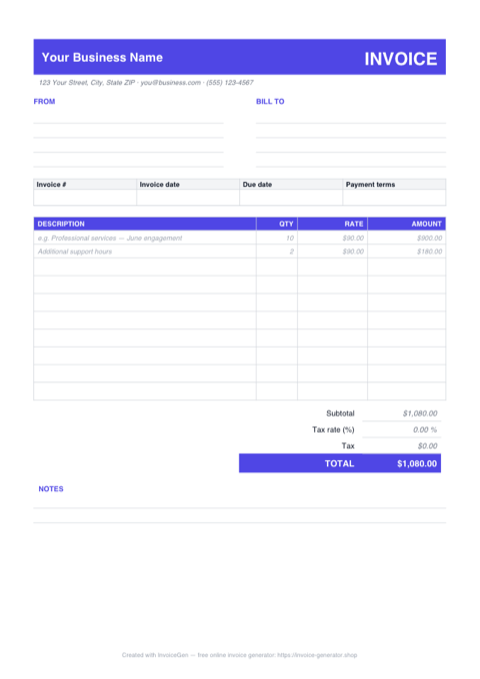
Ready-Made Layout
Header, business and client blocks, invoice number and date fields, a line-item table, and a totals section — all styled and aligned so you only fill in the blanks.
Works Beyond Word
Built with standard Word tables, so the same .docx opens cleanly in Google Docs, LibreOffice Writer, and Apple Pages — no broken columns or shifted headers.
Worked Example Included
Sample line items and totals show exactly where everything goes. Overwrite them with your own details, delete the spare rows, and the invoice is ready to send.
How to Use the Template
Download the .docx
Grab the file with one click — no email address or account needed. Open it in Word, Google Docs, LibreOffice, or Pages.
Fill In Your Details
Replace the placeholder business and client info, list your line items, and type in the amounts and totals. Press Tab in the last cell to add rows.
Export as PDF & Send
Use File > Save As and choose PDF so your client receives a clean, uneditable invoice with the formatting locked in.
What's Inside the Free Word Invoice Template
This Word invoice template is a complete, ready-to-fill invoice — not a blank page with a heading. The .docx includes:
- A styled header and details block — your business name and contact info, a Bill To section, and fields for the invoice number, dates, and payment terms.
- A formatted line-item table — description, quantity, rate, and amount columns with consistent borders and alignment, plus spare blank rows ready to use.
- A totals section — subtotal, tax, and total lines laid out the way clients expect, with worked example values you replace with your own.
- A notes area — space for payment instructions, bank details, or a thank-you message.
- A4-friendly margins — the finished invoice prints (or exports to PDF) on a single clean page.
One thing to know up front: Word documents don't run live formulas, so line amounts and totals are typed in by hand. That's fine for a handful of invoices — just double-check the math before sending. If you want the amounts calculated for you, the Excel version of this template has working formulas, and the online generator does all the math automatically. Manual totals are one of the most common sources of billing errors — our guide on invoicing mistakes to avoid covers the others.
Word Template or Online Generator? A Fair Comparison
Both get you to a professional invoice — the difference is how much of the work is done for you. The Word template gives you a file you fully own and can edit anywhere, even offline. The online generator trades that file-level control for speed: totals, tax, and discounts calculate automatically, your logo is placed for you, it supports 160+ currencies and 16 languages, and a finished PDF is one click away — with no version sprawl like Invoice_March_v2_FINAL.docx to manage.
When Word Templates Still Make Sense
To be fair, there are scenarios where a Word invoice template is a reasonable choice:
- You work in an environment with no reliable internet access — a remote job site, for example.
- Your organization mandates Word-format deliverables for internal compliance or audit trails.
- You only send one or two invoices a year, and the overhead of learning any new tool may not be worth it.
That said, for the vast majority of freelancers and small business owners who invoice regularly, the trade-offs of Word templates — broken formatting, manual math, version sprawl — add up quickly. A browser-based generator eliminates those pain points while producing a more consistent, professional result.
If you are new to freelancing and want to set up your invoicing workflow correctly from the start, our freelancer invoice guide walks through everything you need to know, from what to include on an invoice to how to follow up on late payments.
Whichever route you take, both are free: download the .docx above, or open the InvoiceGen invoice generator and have a finished PDF in seconds.