Photography Invoice Template — Word
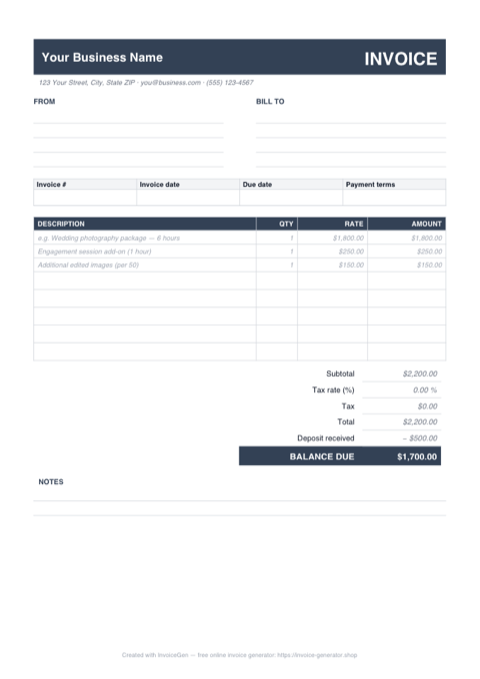
The .docx opens ready to make yours. 'Your Business Name' waits in the header for your studio name, the sample wedding-package and engagement-session rows show exactly where session fees and add-ons go, and the deposit and balance-due lines are already laid out beneath the totals. Brand it once, then export to PDF straight from Word.
Why Word for Photographers
Placeholders that show you what to replace
The header reads 'Your Business Name' with a sample street address beneath it, the invoice number is INV-0001, and the dates read MM/DD/YYYY. Work top to bottom swapping each one — including the pre-filled wedding package and per-50 edited-images rows — and the invoice is yours in a few minutes.
Put your studio logo in the header
Click beside the business name, choose Insert > Pictures, and pick a PNG with a transparent background. Set text wrapping to 'In Front of Text' so you can drag it into position, and keep it around half an inch tall so the BILL TO block below doesn't get pushed onto a second page.
Restyle the charcoal accents to your palette
The headings and table labels use a charcoal-and-grey scheme that reads neutral on purpose. Select a heading, open Home > Font Color > More Colors, and paste the hex code from your website or gallery branding. Repeat for the table header band and the document matches the rest of your client experience.
Doubles as a Google Docs template
Looking for a Google Docs version? Upload this .docx to Drive, double-click it, and choose 'Open with Google Docs' — the item table, deposit row, and balance-due line all convert cleanly. You can then edit in the browser and share or download from there, no Word license required.
Invoicing Challenges for Photographers
Deposits and Balance Payments
Most photographers require a deposit to book a session and collect the balance on delivery. Tracking which clients have paid deposits and what remains due across dozens of bookings gets complicated fast.
Licensing and Usage Rights
Commercial clients pay differently depending on how they use your images. A single image licensed for a billboard campaign costs more than the same image on a blog post, and your invoice needs to spell this out.
Travel and Equipment Expenses
Destination shoots, rental gear, and assistant fees add up. If you do not itemize these on the invoice, clients question the total or you end up absorbing costs you should be passing through.
Photography Word Invoicing Tips
Recheck the three money rows after every edit
Unlike the Excel version, the Word file's figures are plain text — nothing recalculates. The sample shows a $2,200 total minus a $500 deposit leaving $1,700 due, so when you change a package price or add a print order, update Amount, Subtotal, Total, and BALANCE DUE together. A thirty-second read of those rows before exporting the PDF prevents the 'your invoice doesn't add up' reply from a client's accountant.
Define Packages Clearly
List exactly what each package includes — number of edited images, hours of coverage, print credits — so clients can see the value and you have a reference point for add-ons.
Specify Usage Rights on the Invoice
State the license type (personal, commercial, exclusive) and duration directly on the invoice. This protects your intellectual property and justifies premium pricing for commercial usage.
Collect Deposits Before the Shoot
Require a non-refundable deposit (typically 25-50%) to reserve the date. Show it as a line item on the final invoice so the client sees the remaining balance clearly.
Itemize Post-Production Separately
Editing, retouching, and color grading take significant time. Breaking out post-production as its own line item helps clients understand your pricing and opens the door for upselling premium retouching.
What to Include on a Photography Word Invoice
- Session date, time, and location
- Package or session type selected
- Number of final edited images included
- Licensing terms and usage rights granted
- Deposit paid and balance remaining
- Travel and accommodation expenses
- Additional retouching or print fees
- Delivery timeline for final images
Open This Template in Google Docs
- 1
Download the free .docx template using the button above.
- 2
Go to drive.google.com and upload the file to your Drive.
- 3
Right-click the file and choose Open with → Google Docs.
Generate Your Photography Word Invoice Now
Create Invoice — Free, No Sign-UpFrequently Asked Questions
Will this .docx open in older versions of Word or in Pages?
How do I convert this Word invoice to Google Docs?
Can I use this template on my existing studio letterhead?
Related Invoice Tools
Photographers Invoice Generator
Free invoice generator for photographers. Handle session deposits, balance payments, licensing fees, travel expenses, and package pricing with professional PDF invoices.
Word Invoice Template
Free Word invoice template library — download, customize, and send.
Photography Invoice Template
Free photography invoice template for session fees, deposits, licensing, and travel expenses. Create polished PDF invoices that match your portfolio.
Photography Invoice — PDF
Free photography invoice template as a print-ready A4 PDF with blank FROM, BILL TO, and line-item rows, plus a deposit and balance-due section. Fill it in and send it.
Photography Invoice — Excel
Free photography invoice template for Excel. Package and add-on rows multiply quantity by rate, the tax cell is editable, and the retainer feeds the balance.
Contractor Invoice — Word
Editable .docx contractor invoice — type over the placeholders, drop your logo in the header bar, recolor the accent, then export to PDF or open it in Google Docs.
Consulting Invoice — Word
Editable Word .docx consulting invoice — overtype the placeholder firm and client blocks, drop your logo in the blue banner, recolor the accent, and export a PDF.
Auto Repair Invoice — Word
Free auto repair invoice template as a .docx. Overtype the placeholder text, add your shop logo, swap the red accent for your brand color, and save to PDF.