Construction Invoice Template — Word
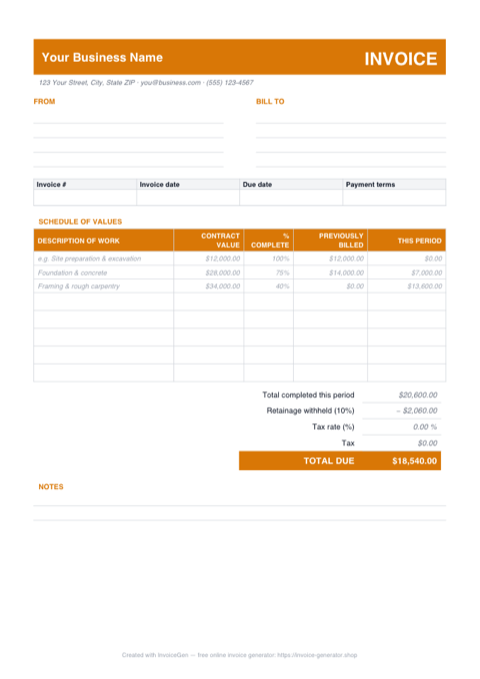
The .docx is the copy you brand. Every placeholder — business name, owner's address block, invoice number — is gray italic text you simply overwrite, the schedule of values is a real Word table with a worked draw example in every column, and the accent color swaps to your company's in a few clicks. Set it up once and every invoice goes out on paper that looks like yours.
Why Word for Construction Companies
Gray placeholders show exactly what to replace
Everything meant to be edited — 'Your Business Name', the client address block, the MM/DD/YYYY dates, the Net 30 terms — is set in gray italics, so a leftover placeholder jumps out before the invoice leaves your desk. Type over each one and the document's own black text never moves.
Drop your logo straight into the header band
Click inside the colored band at the top and use Insert > Pictures. Because the band is a table row, the logo sits cleanly beside your business name without knocking the layout sideways — drag a corner handle until it matches the band height and you're done.
Recolor the amber accent to your company colors
The header band, the schedule of values header row, and the TOTAL DUE row all share one accent shade. Select each, apply your brand color via Table Design > Shading, then match the section headings with the font-color picker. Five minutes turns the generic template into house stationery.
Doubles as your Google Docs template
Upload the .docx to Google Drive and choose Open with > Google Docs — the tables, shading, and totals convert cleanly. If your foreman drafts invoices from a phone in the truck, or you came here looking for a Google Docs version, this same file covers both.
Invoicing Challenges for Construction Companies
AIA-Style Progress Billing
Many commercial projects require AIA G702/G703 formatted applications for payment. These involve schedule-of-values breakdowns, percentage-complete tracking, and cumulative billing — far beyond a simple invoice.
Subcontractor Cost Pass-Through
General contractors bill for their own work plus subcontractor costs. Each sub’s charges need to be clearly represented on the invoice so the owner can track costs by trade and verify the work was completed.
Lien Waiver and Compliance Requirements
Many states require lien waivers to accompany each payment application. Your invoicing workflow needs to account for collecting and submitting these documents alongside every billing cycle.
Construction Word Invoicing Tips
Re-check the totals, then send it as a PDF
Word's tables hold typed numbers, not formulas — so after you edit line amounts, recompute the period total, the retainage deduction, and TOTAL DUE yourself (or pull the figures from the Excel version of this template). Then use File > Save a Copy > PDF before sending: the owner gets a fixed document whose columns can't reflow on their machine.
Use a Schedule of Values
Break the total contract amount into a schedule of values by trade or phase. Each invoice shows the percentage complete and amount billed for each line item, giving the owner full cost visibility.
Track Retainage Cumulatively
Show retainage withheld on each invoice and maintain a running total. When the project reaches substantial completion, submit a separate invoice to release the accumulated retainage.
Separate GC Fees from Sub Costs
Clearly distinguish your general conditions and overhead from subcontractor pass-through costs. This transparency satisfies owner audits and streamlines payment approvals.
Reference Change Orders by Number
Every approved change order should have its own line in the schedule of values. Reference the CO number, date approved, and amount so the owner can reconcile each change against their records.
What to Include on a Construction Word Invoice
- Project name, number, and site address
- Application number and billing period
- Schedule of values with percentage complete
- Work completed this period by line item
- Materials stored on-site (not yet installed)
- Retainage withheld (current and cumulative)
- Approved change order amounts
- Subcontractor cost breakdown by trade
Open This Template in Google Docs
- 1
Download the free .docx template using the button above.
- 2
Go to drive.google.com and upload the file to your Drive.
- 3
Right-click the file and choose Open with → Google Docs.
Generate Your Construction Word Invoice Now
Create Invoice — Free, No Sign-UpFrequently Asked Questions
Will this .docx open in Pages, LibreOffice, or older versions of Word?
How do I convert it to Google Docs without breaking the tables?
Can I put this invoice on my company letterhead?
Related Invoice Tools
Construction Companies Invoice Generator
Free invoice generator for construction companies. Handle AIA-style progress billing, subcontractor costs, retainage, lien waivers, and change orders.
Word Invoice Template
Free Word invoice template library — download, customize, and send.
Construction Invoice Template
Free construction invoice template for progress billing, change orders, and materials tracking. Generate professional PDF invoices for any job size.
Construction Invoice — PDF
Free construction invoice PDF with ruled fill-in fields, a schedule of values grid with example draw lines, and a retainage block. Print, fill, and send.
Construction Invoice — Excel
Free construction invoice in Excel. Schedule of values columns compute each draw, an editable retainage % cell feeds the total due, and rows stay blank-safe.
Cleaning Invoice — Word
Free cleaning invoice template in Word (.docx). Overwrite the placeholders, add your logo, recolor the teal accents, then save as PDF — or open it in Google Docs.
Freelance Invoice — Word
Free editable Word .docx freelance invoice. Overtype the placeholders, drop a logo beside the INVOICE banner, restyle the violet accents to your brand, then export a PDF.
Contractor Invoice — Word
Editable .docx contractor invoice — type over the placeholders, drop your logo in the header bar, recolor the accent, then export to PDF or open it in Google Docs.