Freelance Invoice Template — Word
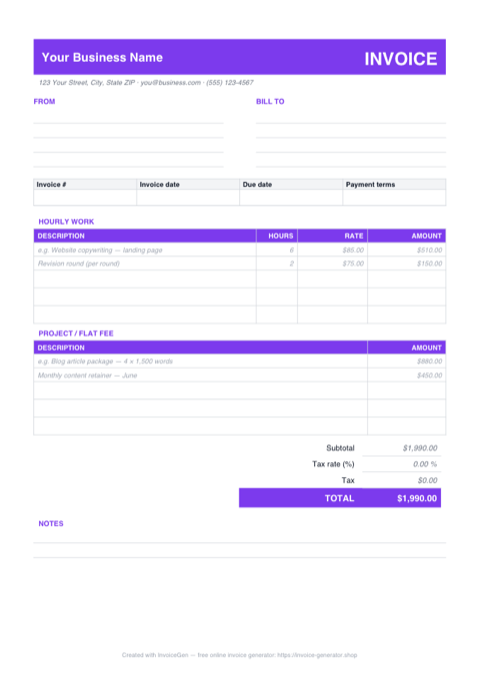
The .docx opens as a finished one-page invoice: placeholder business and client blocks, hourly and flat-fee line-item tables, and a totals stack ready to rebrand. Make it yours once — name, logo, colors — and every future invoice starts from a document that already looks like your studio.
Why Word for Freelancers
Overtype the placeholders — nothing is locked
'Your Business Name', the FROM and BILL TO address blocks, the INV-0001 number, and the MM/DD/YYYY dates are all ordinary table text. Click into each cell, type your details, and the layout holds its shape — no text boxes to nudge, no fields to unlock.
Add your logo beside the INVOICE banner
Click into the top row, choose Insert > Pictures, and place your mark. A transparent PNG sits cleanly on the white page; drag a corner handle to scale it to the banner height and Word keeps it anchored through every later edit.
Swap the violet accent for your brand color
The headings and the INVOICE wordmark share a single accent (violet, hex 7C3AED). Select each, apply your own color from Font Color and the table-shading menu, and the whole document re-skins in a couple of minutes — no styles-panel archaeology.
Doubles as your Google Docs template
Want a Google Docs version? Upload this .docx to Drive, right-click it, and choose Open with > Google Docs. The table layout, accents, and totals convert cleanly, and File > Save as Google Doc gives you a cloud-native master you can copy per client.
Invoicing Challenges for Freelancers
Irregular Income Tracking
Freelance income arrives in unpredictable waves. Without numbered, dated invoices it is nearly impossible to reconcile what has been paid, what is outstanding, and what your actual monthly revenue looks like.
Looking Professional to Clients
A sloppy invoice signals sloppy work. Clients at larger companies expect a polished document with your logo, clear line items, and proper payment details — not a hastily typed email with a total at the bottom.
Chasing Late Payments
Nearly 60% of freelancers experience late payments. Without explicit due dates, late-fee clauses, and a paper trail, you have no leverage when following up on overdue invoices.
Freelance Word Invoicing Tips
Update the totals before you export to PDF
Unlike the Excel version, Word doesn't recalculate — the $1,990.00 Subtotal and TOTAL come from the sample line items and are typed text. After editing your rows, redo Subtotal, Tax, and TOTAL by hand, then go File > Export > Create PDF/XPS so the client receives a fixed, final document.
Set Payment Terms Upfront
Agree on Net 15 or Net 30 terms before starting any project. Print those terms on every invoice so the due date is never ambiguous.
Itemize Hours vs. Fixed Rates
If you bill hourly, list each task with hours and rate. If you bill a flat fee, break it into milestones so the client sees value at every stage.
Follow Up Systematically
Send a friendly reminder three days before the due date, a firm notice on the due date, and escalate weekly after that. Keep a copy of every invoice for your records.
Number Invoices Sequentially
Use a consistent numbering system like INV-2024-001. Sequential numbering makes tax filing faster and helps you spot missing payments at a glance.
What to Include on a Freelance Word Invoice
- Your full legal name or business name
- Client company name and contact
- Invoice number and date issued
- Description of each deliverable or hours worked
- Hourly rate or fixed project fee
- Payment terms (Net 15, Net 30, etc.)
- Accepted payment methods (bank transfer, PayPal, etc.)
- Late payment penalty clause
Open This Template in Google Docs
- 1
Download the free .docx template using the button above.
- 2
Go to drive.google.com and upload the file to your Drive.
- 3
Right-click the file and choose Open with → Google Docs.
Generate Your Freelance Word Invoice Now
Create Invoice — Free, No Sign-UpFrequently Asked Questions
What do I need to open the .docx — will older Word versions work?
Does the template survive conversion to Google Docs?
Can I put the invoice on my existing letterhead?
Related Invoice Tools
Freelancers Invoice Generator
Free invoice generator for freelancers. Track irregular income, look professional to clients, and get paid faster with clear terms and instant PDF downloads.
Word Invoice Template
Free Word invoice template library — download, customize, and send.
Freelance Invoice Template
Free freelance invoice template with automatic totals, tax fields, and instant PDF download. Bill clients professionally in seconds.
Freelance Invoice — PDF
Free freelance invoice template as a print-ready A4 PDF with separate hourly and flat-fee tables, ruled fill-in fields, and a notes block. Fill it in and send.
Freelance Invoice — Excel
Free freelance invoice for Excel (.xlsx). Hourly and flat-fee sections feed one subtotal, amounts stay blank until filled, and a cell sets the tax rate.
Consulting Invoice — Word
Editable Word .docx consulting invoice — overtype the placeholder firm and client blocks, drop your logo in the blue banner, recolor the accent, and export a PDF.
Photography Invoice — Word
Free photography invoice template for Word. Swap the placeholder studio details for yours, drop a logo into the header, restyle the charcoal accents, then export a PDF.
Auto Repair Invoice — Word
Free auto repair invoice template as a .docx. Overtype the placeholder text, add your shop logo, swap the red accent for your brand color, and save to PDF.