Consulting Invoice Template — Word
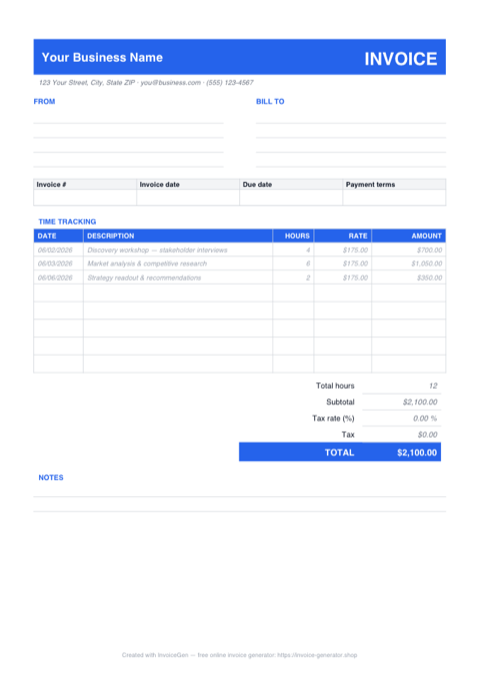
The .docx opens as a complete consulting invoice: a blue banner carrying your firm name and the INVOICE wordmark, FROM and BILL TO blocks, an invoice-details strip with number, dates, and Net 30 terms, and a nine-row time-tracking table pre-filled with sample engagement entries. Brand it once — name, logo, accent — and every retainer cycle after that starts from a document that already looks like your practice.
Why Word for Consultants
Placeholders show you exactly what to replace
'Your Business Name' in the banner, the FROM and BILL TO address blocks, INV-0001, the MM/DD/YYYY dates, and the Net 30 terms are all ordinary table text — click in and overtype. The sample entries (a discovery workshop, market analysis, a strategy readout) model how to phrase deliverable-level time entries before you replace them.
Rebrand the banner in two edits
The header is a blue-shaded table cell (hex 2563EB). Click inside it and use Table Design > Shading to swap in your firm's color, then Insert > Pictures to set your logo beside the name. The body is Calibri throughout — restyle it to the typeface your proposals use and the whole document follows.
Keep a pre-filled master per retainer client
For monthly retainers, save one branded copy per client with the BILL TO block, payment terms, and standard rate already in place. Each cycle becomes: update the dates and hours, bump the invoice number, export. Save the master as a .dotx template and Word opens a fresh copy every time.
Searched for a Google Docs version? This file is it
Upload the .docx to Google Drive, right-click, and choose Open with > Google Docs — the banner shading, the time-tracking table, and the totals block convert cleanly. Edit in the browser from any machine, then File > Download as PDF or Word when the engagement period closes.
Invoicing Challenges for Consultants
Hourly vs. Retainer Billing Confusion
Some clients want hourly transparency while others prefer a predictable monthly retainer. Switching between billing models across clients — and sometimes within a single engagement — creates invoicing headaches.
Scope Creep Eating Into Margins
That quick call turns into a two-hour strategy session. Without tracking and invoicing every hour, scope creep silently erodes your profitability across engagements.
Invoicing International Clients
Cross-border consulting means dealing with multiple currencies, varying tax rules, and different payment methods. A single-currency invoice template does not cut it.
Consulting Word Invoicing Tips
Recompute the totals before the invoice leaves your desk
The Total hours (12), Subtotal ($2,100.00), Tax, and TOTAL are typed text from the sample entries — Word doesn't recalculate when you change the rows. After editing your time entries, redo the arithmetic by hand, or run the numbers in the Excel version of this template and paste the final figures here. Then File > Save As > PDF, so the client receives a locked copy and your .docx stays the editable master.
Reference Your Engagement Letter
Include the engagement letter or SOW number on every invoice. This ties each charge back to an agreed scope and makes disputes far less likely.
Log Time Contemporaneously
Record hours as you work, not at the end of the week from memory. Contemporaneous time entries are more accurate and more defensible if a client questions a charge.
Set a Retainer Reconciliation Cadence
For retainer clients, reconcile unused hours monthly. Show the retainer amount, hours used, and any rollover or overage on each invoice so there are no surprises.
Use the Client’s Currency
Invoicing in your international client’s local currency removes friction from the payment process and shows cultural sensitivity — a small gesture that strengthens the relationship.
What to Include on a Consulting Word Invoice
- Engagement or SOW reference number
- Date range for the billing period
- Itemized time entries with descriptions
- Hourly rate or retainer amount
- Hours used vs. retainer hours included
- Expenses incurred (travel, software, etc.)
- Currency and applicable tax or VAT
- Payment instructions including wire details for international transfers
Open This Template in Google Docs
- 1
Download the free .docx template using the button above.
- 2
Go to drive.google.com and upload the file to your Drive.
- 3
Right-click the file and choose Open with → Google Docs.
Generate Your Consulting Word Invoice Now
Create Invoice — Free, No Sign-UpFrequently Asked Questions
Do I need Microsoft Word to use this consulting invoice .docx?
How well does it convert to Google Docs?
Can I move the invoice onto my firm's letterhead?
Related Invoice Tools
Consultants Invoice Generator
Free invoice generator for consultants. Bill hourly or on retainer, manage scope creep, handle international clients, and create professional PDF invoices in seconds.
Word Invoice Template
Free Word invoice template library — download, customize, and send.
Consulting Invoice Template
Free consulting invoice template for hourly, retainer, and project billing. Track engagements and download professional PDF invoices instantly.
Consulting Invoice — PDF
Free consulting invoice PDF with a date/hours/rate time-tracking table, FROM and BILL TO blocks, and a notes area. Fill it on screen, print it, or email it.
Consulting Invoice — Excel
Free consulting invoice for Excel (.xlsx): a time-tracking sheet where Date, Hours, and Rate feed blank-safe formulas, a Total hours counter, and a tax cell.
Cleaning Invoice — Word
Free cleaning invoice template in Word (.docx). Overwrite the placeholders, add your logo, recolor the teal accents, then save as PDF — or open it in Google Docs.
Freelance Invoice — Word
Free editable Word .docx freelance invoice. Overtype the placeholders, drop a logo beside the INVOICE banner, restyle the violet accents to your brand, then export a PDF.
Construction Invoice — Word
Free construction invoice template in Word. Overwrite the placeholder text, drop in your logo, recolor the accent to match your company, and save to PDF.