Cleaning Invoice Template — Word
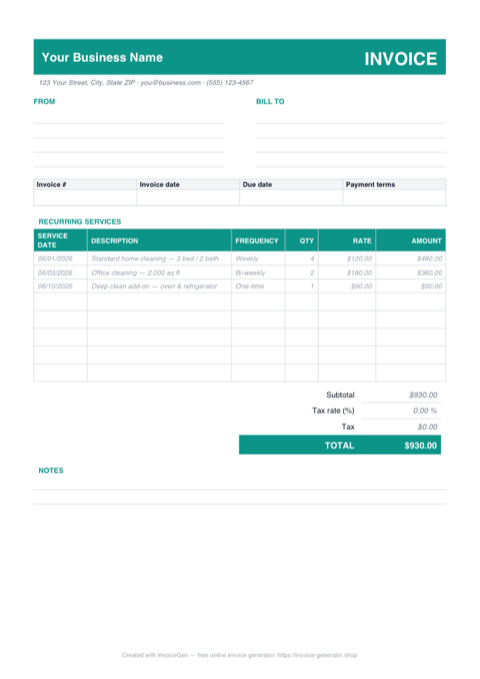
The .docx is a finished cleaning invoice you rebrand once and reuse all season. Every placeholder — business name, client block, the three sample service lines — is ordinary text you click and type over, the teal header shading recolors in two clicks, and the header has room for a logo beside your name. When it finally looks like your company, File > Save As > PDF and send.
Why Word for Cleaning Services
Placeholders to replace, not blanks to design
The template ships already filled out — 'Your Business Name', INV-0001, a 3 bed / 2 bath weekly clean in the services table. You're swapping example text for real details, so there's no aligning tables or formatting a layout from scratch.
Recolor the teal accent to match your van wrap
The header bar and the services-table heading use one teal shade. Select them, then use Table Design > Shading and the font color picker to apply your brand color — the whole invoice rebrands in under a minute.
Your logo drops into the header
Click beside the business name, go to Insert > Pictures, and resize to roughly the height of the name text. Word keeps it anchored in the header block, so it shows up in the same spot on every invoice you make from this file.
Doubles as your Google Docs template
Searching for a Google Docs cleaning invoice? Upload this .docx to Drive, double-click it, and choose Open with Google Docs — the tables, shaded headers, and totals block convert cleanly, and from there you can edit on any device and share by link.
Invoicing Challenges for Cleaning Services
Recurring Billing Management
Most cleaning clients are on weekly, bi-weekly, or monthly schedules. Generating individual invoices for every visit is tedious, but bundling visits into a monthly invoice requires careful tracking of completed services.
Multiple Locations for Commercial Clients
A single commercial client may have several offices or properties. Each location has different square footage, service frequency, and pricing — and the client often wants one consolidated invoice.
Supply and Equipment Cost Recovery
Cleaning supplies and equipment wear are real costs. Deciding whether to absorb them in your rate or pass them through as line items affects pricing transparency and client expectations.
Cleaning Word Invoicing Tips
Update the totals block last — Word doesn't do math
Unlike the Excel version, the amounts here are typed text. After you edit the service lines, recompute each amount (visits × rate), then retype the subtotal and TOTAL before exporting the PDF. A stale total is the number-one reason a cleaning client phones instead of pays, so make this the final pass every time.
Create Service Packages
Define packages like Basic (vacuum, dust, mop), Deep Clean (add windows, baseboards, appliances), and Move-Out (everything). Listing the package on the invoice sets clear expectations for what was performed.
Invoice on a Monthly Cycle
For recurring clients, compile all visits into a monthly invoice. List each visit date and service performed so the client can verify against their schedule before paying.
Track Supplies Separately for Large Contracts
For commercial contracts where you supply all materials, add a supplies line item or a flat materials surcharge. This makes your labor rate look competitive while recovering real costs.
Include Scheduling Notes
Note the regular schedule (e.g., every Tuesday and Thursday, 8 AM - 12 PM) on the invoice header. This serves as a service-level agreement and helps both parties confirm the expected cadence.
What to Include on a Cleaning Word Invoice
- Service package or type performed
- Dates of each cleaning visit
- Property address and square footage
- Number of crew members and hours per visit
- Supplies and materials cost (if passed through)
- Frequency (weekly, bi-weekly, monthly)
- Special services (carpet cleaning, window washing)
- Next scheduled service date
Open This Template in Google Docs
- 1
Download the free .docx template using the button above.
- 2
Go to drive.google.com and upload the file to your Drive.
- 3
Right-click the file and choose Open with → Google Docs.
Generate Your Cleaning Word Invoice Now
Create Invoice — Free, No Sign-UpFrequently Asked Questions
Do I need Microsoft Word to use this template?
Does the template convert cleanly to Google Docs?
Can I turn this invoice into letterhead for my cleaning business?
Related Invoice Tools
Cleaning Services Invoice Generator
Free invoice generator for cleaning services. Manage recurring billing, multiple locations, supply costs, and service packages with professional PDF invoices.
Word Invoice Template
Free Word invoice template library — download, customize, and send.
Cleaning Service Invoice Template
Free cleaning service invoice template for recurring billing, multiple locations, and service packages. Download professional PDF invoices instantly.
Cleaning Invoice — PDF
Free cleaning invoice template as a print-ready A4 PDF. Sample weekly and bi-weekly service lines show how to bill — print it, fill in the visits, and email it.
Cleaning Invoice — Excel
Download a free cleaning invoice template in Excel (.xlsx) with service date and frequency columns, blank-safe amount formulas, an editable tax cell, and live totals.
Contractor Invoice — Word
Editable .docx contractor invoice — type over the placeholders, drop your logo in the header bar, recolor the accent, then export to PDF or open it in Google Docs.
Consulting Invoice — Word
Editable Word .docx consulting invoice — overtype the placeholder firm and client blocks, drop your logo in the blue banner, recolor the accent, and export a PDF.
Photography Invoice — Word
Free photography invoice template for Word. Swap the placeholder studio details for yours, drop a logo into the header, restyle the charcoal accents, then export a PDF.